Writing a Minecraft clone in Rust
Context
This project started 10 months ago. I wanted to learn more about Rust, and see what it took to write a custom game engine.
And because I grew up with Minecraft, I wanted to shoot my shot at making a Minecraft clone myself.
Tools
I could have used Bevy as a game engine, but to stay in the spirit of re-inventing the wheel, I decided to make my own game engine.
I'll surely write another couple posts about all interesting the design choices and bugs I encountered when making my engine, but here I wanted to talk about the block game I've started.
I used wgpu for rendering, winit for window handling, and cgmath for vector and matrix math.
I could have made a backend with Vulcan if I wanted peak efficiency, but a game like minecraft
isn't very GPU intensive. Being cross-platform is important to me, so wgpu was the natural choice.
Mesh generation
This is pretty simple but tedious code to write. Each possible 6 faces have a separate case. Nothing much interesting here. I did spend a lot of time structuring my engine for mesh generation this to be possible outside of the actual engine code. I don't want to be working with Wgpu buffers outside my engine code!
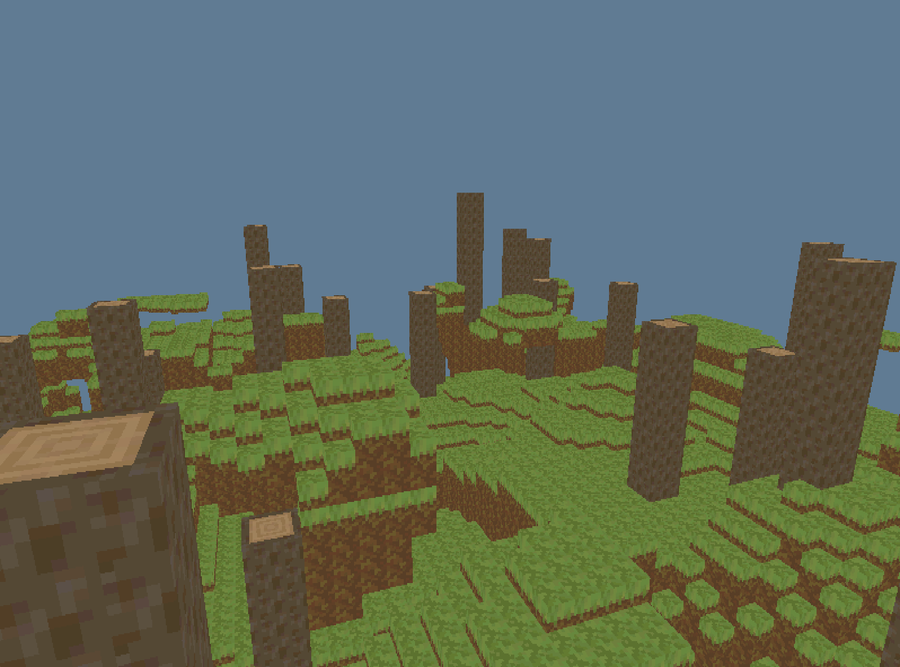
This is what my voxel generation looks like now.
Rotating blocks
I wanted to have a block represent the corner of a wood log. I also wanted to be able to rotate or
flip these blocks any way possible. Minecraft allows certain blocks to be rotated in certain ways,
but it's a bit hard-coded. I wanted full rotation freedom for any block.
Mathematically, this could be represented by a 3x3 transformation matrix.
I also wanted this orientation data to be as small as possible: so 3x3 f32 arrays are out of the
question. I also wanted to avoid unnecessary floating point operations.
I wrote my own 3x3 matrix class that could only have orthonormal axis-aligned transformations.
No stretching, no diagonal blocks, no warping, only 90 degree turns and flips across an axis.
I could avoid 3x3 float matrices, saving a lot on operations and memory, all while using the
same useful operators like Mul and Add.
Rust's traits and enums make this really intuitive:
#[repr(i8)] // so we can do `as i8`, fast conversion
pub enum Sign {
    Neg = -1,
    Zero = 0,
    Pos = 1,
}

/// An orthonormal axis-aligned transform
pub struct VoxelTransform {
    a: [[Sign; 3]; 3],
}
Using matrices for this allowed me to apply these transformations to the UV coordinates I picked for each block face, so I could rotate UV coordinates as needed if a block was rotated.
This allowed me to do fun things that even Minecraft doesn't do. For example :
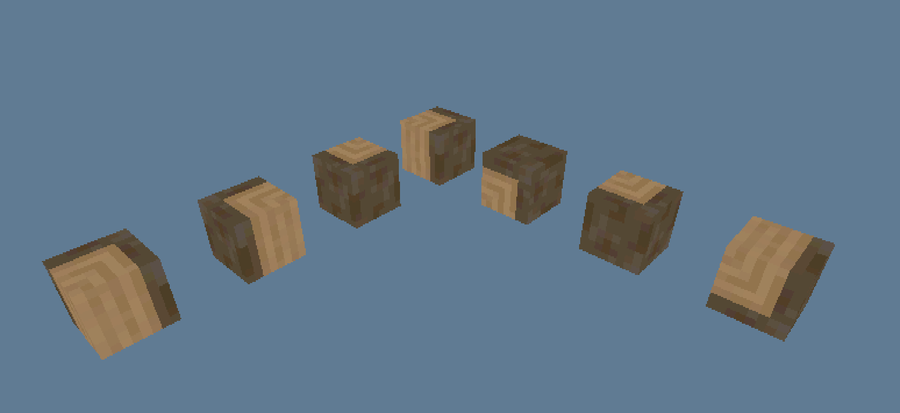
Here, I'm not rotating the voxel model (actually, they're all part of the same model), I'm just changing the UV mapping of the mesh!
Collider generation
At this point I didn't have any colliders in my engine or my game, so it wasn't very interesting to play. I looked into several different collision algorithms.
Collision is a really heavy task, especially when it needs to be done 60 times a second. Some questions you need to ask to have faster collision :
- Does my collider have a certain shape?
- Spheres are very simple to check, for example.
- Is my collider concave or convex?
- With convex colliders, you can use the separating axis theorem.
In the case of voxels, we have axis-aligned bounding boxes (AABB), which are actually one of the simplest kinds of collisions to check. You just compare min/max coordinates along each axis to see if two boxes overlap.
I started the naive way, by adding one collider for each voxel. As expected, it was slow. Less than 1 FPS with a couple thousand voxels. I knew I could optimize the algorithm to merge voxels. If I have a 3x3x3 solid block of voxels, I can have one AABB collider instead of 27. For example:
+---+
|0  |
|   |
+---+
+---++---+
|1  ||2  |
|   ||   |
+---++---+
+---++---++---+
|3  ||4  ||5  |
|   ||   ||   |
+---++---++---+
Becomes ...
+---+
|1  |
|   |
+---+
+--------+
|2       |
|        |
|        |
|        |+---+
|        ||3  |
|        ||   |
+--------++---+
The problem to finding the true minimum number of boxes for a given voxel grid is NP-hard. But we can use a good greedy solution to get reasonable performance gains.
This was a very contained optimization so I decided to give the problem to AI. It spat out a solution that was written as I wanted it (always check your bot's homework !). I went from about 1 FPS to a solid 20 FPS. Adding compilation optimizations, I had a smooth >60 FPS. Thanks Chat!
I still have many, many optimizations to add to my engine, and my future blogs will be about those. Two that come to mind now are:
- Caching important components like Transforms, Models, and Colliders
- Organizing colliders in faster structures (bounding volume hierarchy, specifically)
Stay tuned!